
input标签概述
2017-03-06 22:39:01
•
阅读
打赏
input标签语法
input标签是自闭合标签,没有结束标签。
<input type="表单类型"/>
input标签type属性
input标签有很多type属性,为我们提供了多种信息展示形式及交互方式
text:单行文本框,用于填写一些简单的信息
语法:<input type="text"/>
password:密码文本框,用于输入密码,密码明文不会显示出来
语法:<input type="password"/>
radio:单选按钮,用于互斥选项的选择,name属性要为一样
语法:<input type="radio"/>
checkbox:复选框,用于选项的多选
语法:<input type="checkbox"/>
reset:重置按钮,用于清空改按钮所在form里其他input标签填写的值
语法:<input type="reset"/>
submit:提交按钮,用于将填写的信息提交后台服务器处理
语法:<input type="submit"/>
|
1
2
3
4
5
6
7
8
9
10
11
12
13
14
15
16
17
18
19
20
|
<!DOCTYPE html> <head> <title>input标签</title></head><body> <form name="login" action="/index/login" method="post" target="_blank" enctype="application/x-www-form-urlencoded"> 账号:<input type="text"/><br/> 密码:<input type="password"/><br/> 性别: <input type="radio" name="sex"/>男 <input type="radio" name="sex"/>女<br/> 你喜欢哪些: <input type="checkbox" />苹果 <input type="checkbox" />香蕉<br/> <input type="submit" value="提交"/> <input type="reset" value="重填"/> </form></body></html> |
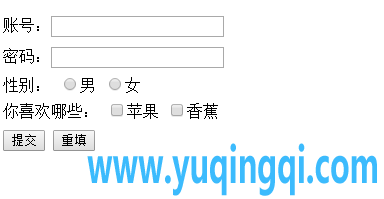
hidden:隐藏域,用于在页面保存一些不用显示出来的信息
语法:<input type="hidden"/>
file:文件上传,用于文件的上传
语法:<input type="file"/>
button:按钮
语法:<input type="button"/>
image:图像形式
语法:<input type="image"/>
input标签其他属性
| input属性 | 说明 |
|---|---|
| value | 文本框的值,是文本框内的文字或代表的值 |
| size | 文本框的长度,以字符为单位,浏览器显示的长度 |
| maxlength | 文本框中最多输入的字符数(文本输入框) |





相关推荐
深度学习 -- 损失函数
深度残差网络(Deep Residual Networks (ResNets))
深度学习 -- 激活函数
神经网络训练 -- 调整学习速率
生成对抗网络(GAN)改进与发展
生成对抗网络(GAN)优点与缺点
生成对抗网络(GAN)的训练
生成对抗网络(GAN)基本原理
生成模型与判别模型