
php7.3源码编译安装 configure: error: Please reinstall the libzip distribution解决方案
2021-03-27 18:18
阅读 873
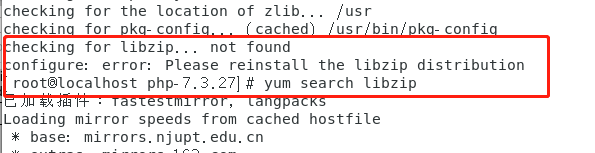
使用configure时出现Please reinstall the libzip distribution的错误
1.使用老版本libzip-1.2.0
[root@localhost ~]# wget https://nih.at/libzip/libzip-1.2.0.tar.gz
[root@localhost ~]# tar -zxvf libzip-1.2.0.tar.gz
[root@localhost ~]# cd libzip-1.2.0
[root@localhost ~]# ./configure
[root@localhost ~]# make -j4 && make install
2.使用最新版libzip-1.5.2
[root@localhost ~]# wget https://libzip.org/download/libzip-1.5.2.tar.gz
[root@localhost ~]# tar -zxf libzip-1.5.2.tar.gz
[root@localhost ~]# cd libzip-1.5.2
[root@localhost ~]# mkdir build
[root@localhost ~]# cd build
[root@localhost ~]# cmake ..        (#注意:cmake后面有两个小数点)
[root@localhost ~]# make -j4
[root@localhost ~]# make test
[root@localhost ~]# make install
如果出现这个-bash: make: command not found提示,是因为安装系统的时候使用的是最小化mini安装,系统没有安装make、vim等常用命令,直接yum安装下即可。
yum -y install gcc automake autoconf libtool make如果发现 cmake没有安装,使用下面方法进行安装
1、安装gcc等必备程序包(已安装则略过此步)
yum install -y gcc gcc-c++ make automake
2、安装wget (已安装则略过此步)
yum install -y wget
3、获取CMake源码包
wget https://cmake.org/files/v3.12/cmake-3.12.0-rc1.tar.gz
4、解压CMake源码包
tar -zxvf cmake-3.12.0-rc1.tar.gz
5、进入cmark的源码目录
cd cmake-3.12.0-rc1
6、运行当前目录下的一个文件
./bootstrap
7、运行命令(这步时间有点长)
gmake
8、进行安装
gmake install
9、安装完成,可阅读install_manifest.txt查看具体都安装了什么,还可以通过cmake --version 查看cmake版本号,如果输出版本号,则安装成功。

评论列表(0条)