
Neo4j下载
在官网:https://neo4j.com/download-center/#community下载页面,下载地址:Neo4j 4.2.3 (zip)
Neo4j安装
把下载的Neo4j 4.2.3 (zip)解压到主目录,“D:\Program Files\neo4j-community-4.2.3”。
Neo4j应用程序有如下主要的目录结构:
- bin目录:用于存储Neo4j的可执行程序;
- conf目录:用于控制Neo4j启动的配置文件;
- data目录:用于存储核心数据库文件;
- plugins目录:用于存储Neo4j的插件;
1. 创建系统环境变量
创建主目录环境变量NEO4J_HOME,并把主目录设置为变量值。再修改变量path,增加%NEO4J_HOME%\bin

2. 安装JDK11或openJDK11
创建环境变量JAVA_HOME,
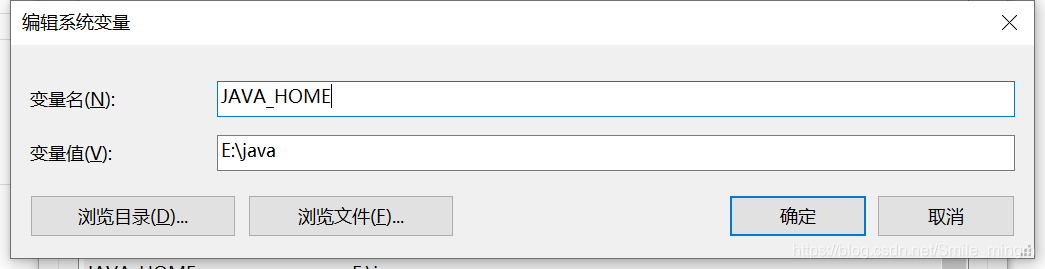
再选中系统变量中的Path,点击编辑,点击新建,在其中输入%JAVA_HOME%\bin,并将这一条上移到顶部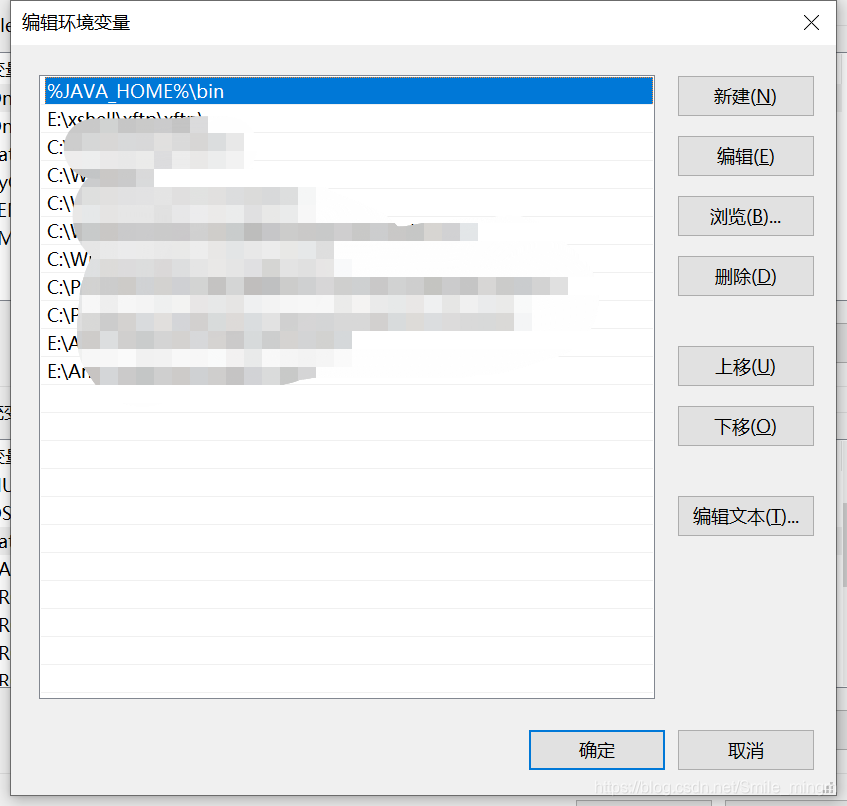
点击确定,这样就配置成功了
Neo4j运行
win + R 进入到命令行窗口
进入到下载的neo4j 的bin目录下:cd /d 路径
安装为windows服务
输入:neo4j install-service
输入:neo4j start
直接运行
输入:neo4j console
数据管理器
打开浏览器输入:http://localhost:7474/
如果系统为windows7,一般需要升级PowerShell版本为3.0以上,参考:https://docs.microsoft.com/zh-cn/powershell/scripting/windows-powershell/install/installing-windows-powershell?view=powershell-7.1&viewFallbackFrom=powershell-6
如需在 Windows 中更新现有 PowerShell 版本,请使用下表找到要更新至的 PowerShell 版本的安装程序。
升级现有 WINDOWS POWERSHELL
| Windows | PS 3.0 | PS 4.0 | PS 5.0 | PS 5.1 |
|---|---|---|---|---|
| Windows 10(参见说明 1) Windows Server 2016 | - | - | - | 已安装 |
| Windows 8.1 Windows Server 2012 R2 | - | 已安装 | WMF 5.0 | WMF 5.1 |
| Windows 8 Windows Server 2012 | 已安装 | WMF 4.0 | WMF 5.0 | WMF 5.1 |
| Windows 7 SP1 Windows Server 2008 R2 SP1 | WMF 3.0 | WMF 4.0 | WMF 5.0 | WMF 5.1 |
Windows 10 初始版本中,由于已启用自动更新,因此 PowerShell 会从版本 5.0 更新至 5.1。 如果 Windows 10 原始版本未通过 Windows 更新进行更新,则 PowerShell 版本为 5.0。

评论列表(0条)