
本文介绍PHP常用支付开发集成方法。
苹果支付(Apple Pay)
介绍:
Apple Pay是iOS客户端一种不可或缺的支付方式,重要性也是不言而喻的。
Apple Pay流程:
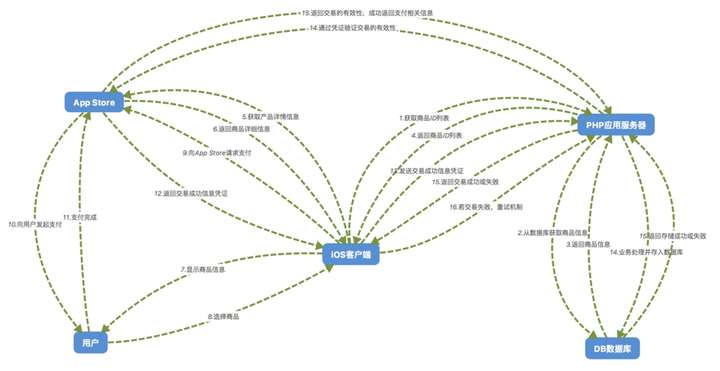
1.iOS客户端向PHP应用服务器发起获取商品信息列表(主要是商品ID,可能还包含折扣信息之类的)的请求
2.PHP应用服务器从数据库获取商品详细列表(如果多个渠道,可以分别配置)
3.数据库返回商品详细列表给PHP应用服务器
4.PHP应用服务器返回商品信息给iOS客户端
5.iOS客户端根据商品ID请求App Store获取商品详细信息(此详细信息是在App Store上架的商品信息)
6.App Store返回商品详细信息给iOS客户端
7.iOS客户端将商品详细信息展示给用户
8。用户选择商品
9.iOS客户端根据商品信息请求App Store调用Apple Pay
10.App Store向用户发起Apple Pay
11.用户付款,支付通知App Store
12.App Store将支付凭证发送给iOS客户端
13.iOS客户端保存支付凭证,将凭证和uid请求PHP应用服务器
14.PHP应用服务器将支付凭证请求App Store验证支付信息
15.App Store验证成功则返回支付信息(Apple Pay订单号,商品ID等)给PHP应用服务器
16.PHP应用服务器验证是否重复请求,重复请求返回iOS客户端重复请求,订单合法则处理业务逻辑
17.PHP应用服务器保存订单于数据库,修改数据库用户余额等
18.数据库返回PHP应用服务器处理成功
19.PHP应用服务器返回iOS客户端是否成功
20.iOS客户端若接受成功或重复请求,都应当中订单完成(删除支付凭证),否则应用保留支付凭证进行重试机制
获取商品列表:
/**
 * 获取商品列表
 * @return array
 */
public function goods()
{
    $sql = 'SELECT * FROM `goods`';
    $pdo = $this->pdo;
    $stmt = $pdo->query($sql);
    $list = $stmt->fetchAll(PDO::FETCH_ASSOC);
    return $list;
}
支付回调:
/**
 * 支付回调(客户端发起)
 * @return mixed
 */
public function notify()
{
    $receipt = $_REQUEST['receipt'];
    $uid = $_REQUEST['uid'];

    try {

        // 参数检测
        if (empty($receipt) || empty($uid)) {
            throw new Exception('参数错误', -1);
        }

        // 确定校验模式(提审的时候是使用沙盒模式)
        $isSandBox = true; //是否使用沙盒模式,比如审核的时候用沙盒模式
        if ($isSandBox) {
            $endpoint = self::APPLE_PAY_SANDBOX_URL; // 'https://sandbox.itunes.apple.com/verifyReceipt';
        } else {
            $endpoint = self::APPLE_PAY_URL; // 'https://buy.itunes.apple.com/verifyReceipt';
        }

        // 请求校验
        $postData = json_encode(array('receipt-data' => $receipt));
        $ch = curl_init($endpoint);
        curl_setopt($ch, CURLOPT_RETURNTRANSFER, true);
        curl_setopt($ch, CURLOPT_POST, true);
        curl_setopt($ch, CURLOPT_POSTFIELDS, $postData);
        curl_setopt($ch, CURLOPT_TIMEOUT, 20); //超时时间
        curl_setopt ($ch, CURLOPT_SSL_VERIFYPEER, 0);  //这两行一定要加,不加会报SSL 错误
        curl_setopt ($ch, CURLOPT_SSL_VERIFYHOST, 0);
        $response = curl_exec($ch);
        $errno = curl_errno($ch);
        $error = curl_error($ch);
        curl_close($ch);

        if ($errno) {
            throw new Exception($error, -2);
        }
        $result = json_decode($response, true);

        if (empty($result) || $result['status'] != 0) {
            throw new Exception('订单验证失败', -3);
        }

        // 判断是否是本应用订单,防止跨app攻击
        $bundleId = $result['receipt']['bundle_id'];
        if ($bundleId != self::CLIENT_BUNDLE_ID) {
            throw new Exception('非本应用订单', -4);
        }

        $allOrder = $result['receipt']['in_app'];
        if (empty($allOrder)) {
            throw new Exception('订单列表为空', -5);
        }

        $newOrder = end($allOrder);
        $transactionId = $newOrder['transaction_id'];
        $productId = $newOrder['product_id'];

        // 判断是否存在订单,防止重复验证
        $pdo = $this->pdo;
        $sql = 'select * from `order` where transaction_id = ? limit 1';
        $stmt = $pdo->prepare($sql);
        $stmt->execute(array('transaction_id' => $transactionId));
        if ($order = $stmt->fetch(PDO::FETCH_ASSOC) !== false) {
            throw new Exception('重复验证', 1);
        }

        // 获取商品详细信息用于业务处理
        $sql = 'SELECT * FROM `goods` where goods_id = ? limit 1';
        $stmt = $pdo->prepare($sql);
        $stmt->execute(array('goods_id' => $productId));
        if ($good = $stmt->fetch(PDO::FETCH_ASSOC) === false) {
            throw new Exception('商品信息错误', -6);
        }

        // 插入订单表
        $sql = 'insert into `order` (`transaction_id`, `uid`, `price`, `goods_id`, `goods_money`) value (?, ?, ?, ?, ?)';
        $stmt = $pdo->prepare($sql);
        $result = $stmt->execute(array($transactionId, $uid, $good['price'], $good['goods_id'], $good['goods_money']));
        if (empty($result)) {
            throw new Exception('插入订单失败', -7);
        }

        // 修改用户余额
        $sql = 'update FROM `user` set money = ? where uid = ?';
        $stmt = $pdo->prepare($sql);
        $result = $stmt->execute(array($good['goods_money'], $uid));
        if (empty($result)) {
            throw new Exception('修改余额错误', -8);
        }

        $return['code'] = 0;
        $return['msg'] = '支付成功';
    } catch (Exception $e) {
        $return['code'] = $e->getCode();
        $return['msg'] = $e->getMessage();
    }

    return $return;
}
注意事项:
1.申请账号,上架商品信息等前提工作详见官方文档
2.服务器返回成功或者重复验证,客户端都应将相应订单视为操作成功
3.CURL请求苹果校验链接有低概率出现超时现象,因此需要客户端完善重试机制
PayPal
介绍:
PayPal是跨国交易首选的在线付款方式,使用邮箱申请PayPal账号之后,直接使用账号就可以进行收款,非常方便。
PayPal流程:
1.客户端(Android或iOS或H5)获取商品信息并展示给用户
2.用户选择商品创建订单,客户端请求服务器创建订单
3.客户端获取订单信息请求PayPal进行支付
4.支付完成,PayPal通过即时付款通知 (IPN)通知提前设置好的服务器URL地址
5.客户端根据订单请求服务器获取订单状态,若订单未处理完(PayPal还未回调给服务器),过段时间重复请求
获取商品:
/**
 * 获取商品列表
 * @return array
 */
public function goods()
{
    $sql = 'SELECT * FROM `goods`';
    $pdo = $this->pdo;
    $stmt = $pdo->query($sql);
    $list = $stmt->fetchAll(PDO::FETCH_ASSOC);
    return $list;
}
创建订单:
/**
 * 创建订单
 * @return mixed
 */
public function createOrder()
{
    $uid = $_REQUEST['uid'];
    $goodsId = $_REQUEST['goodsId'];
    try {

        // 判断参数
        if (empty($uid) || empty($goodsId)) {
            throw new Exception('参数错误', -1);
        }

        // 查询商品信息
        $pdo = $this->pdo;
        $sql = 'SELECT * FROM `goods` WHERE `goods_id` = ? LIMIT 1';
        $stmt = $pdo->prepare($sql);
        $stmt->execute(array($goodsId));
        if ($goods = $stmt->fetch(PDO::FETCH_ASSOC) === false) {
            throw new Exception('商品信息错误', -2);
        }

        // 生成订单号插入订单表
        $transactionId = uniqid();
        $sql = 'insert into `order` (`transaction_id`, `uid`, `price`, `goods_id`, `goods_money`, `status`) value (?, ?, ?, ?, ?, ?)';
        $stmt = $pdo->prepare($sql);
        $result = $stmt->execute(array($transactionId, $uid, $goods['price'], $goods['goods_id'], $goods['goods_money'], 0));
        if (empty($result)) {
            throw new Exception('插入订单失败', -3);
        }
        $data['transactionId'] = $transactionId;

        // 返回数据
        $return['data'] = $data;
        $return['code'] = 0;
        $return['msg'] = '支付成功';
    } catch (Exception $e) {
        $return['code'] = $e->getCode();
        $return['msg'] = $e->getMessage();
    }

    return $return;
}
PayPal通过即时付款通知 (IPN)机制通知:
/**
 * PayPal通过即时付款通知 (IPN)机制通知
 * 即时付款通知 @see https://www.paypal.com/en/cgi-bin/webscr?cmd=p/acc/ipn-info-outside
 * @return bool
 */
public function notify()
{
    try {

        // 判断环境
        define("USE_SANDBOX", true); // 是否使用沙盒环境
        if (USE_SANDBOX) {
            $endpoint = 'https://www.sandbox.paypal.com/cgi-bin/webscr';
            $receiverEmail = array( // 收款邮箱
                'MMr.litt-test@gmail.com'
            );
        } else {
            $endpoint = 'https://www.paypal.com/cgi-bin/webscr';
            $receiverEmail = array(
                'MMr.litt@gmail.com'
            );
        }

        // 获取PayPal通过IPN机制通知的订单数据
        $input = file_get_contents("php://input");
        if (empty($input)) {
            throw new Exception("获取内容为空", -1);
        }

        // 添加验证命令回调PayPal验证订单是否合法
        $cmd = 'cmd=_notify-validate';
        $postData = $cmd . "&" .$input;

        $ch = curl_init();
        curl_setopt($ch, CURLOPT_URL, $endpoint);
        curl_setopt($ch, CURLOPT_RETURNTRANSFER, 1);
        curl_setopt($ch, CURLOPT_POST, 1);
        curl_setopt($ch, CURLOPT_POSTFIELDS, $postData);
        $output = curl_exec($ch);
        if(curl_errno($ch)) {
            throw new Exception("CURL请求失败,错误码:" . curl_error($ch), -2);
        }

        // 判断验证订单是否合法
        if (strcmp ($output, "VERIFIED") == 0) { // 验证通过
            parse_str($postData, $postDataArr);

            // 检查支付状态(payment_status)是否是完成(Completed)
            if ($postDataArr['payment_status'] != 'Completed') {
                throw new Exception("订单状态未完成");
            }

            // 检查收款账号是否自己的账号
            if (!in_array($postDataArr['receiver_email'], $receiverEmail)) {
                throw new Exception("收款账号不是自己的账号");
            }

            // 获取订单信息
            $pdo = $this->pdo;
            $sql = 'select * from `order` where transaction_id = ? limit 1';
            $stmt = $pdo->prepare($sql);
            $stmt->execute(array('transaction_id' => $postDataArr['invoice']));
            $order = $stmt->fetch(PDO::FETCH_ASSOC);
            if ($order === false) {
                throw new Exception('订单不存在', -3);
            }

            // 判断订单是否支付完成(支付完成直接返回成功)
            if ($order['status'] == 1) {
                return true;
            }

            // 修改订单表
            $sql = 'update `order` set `status` = ? where `transaction_id` = ?';
            $stmt = $pdo->prepare($sql);
            $result = $stmt->execute(array(1, $order['transaction_id']));
            if (empty($result)) {
                throw new Exception('订单修改失败', -4);
            }

            // 修改用户余额
            $sql = 'update FROM `user` set money = ? where uid = ?';
            $stmt = $pdo->prepare($sql);
            $result = $stmt->execute(array($order['goods_money'], $order['uid']));
            if (empty($result)) {
                throw new Exception('修改余额错误', -5);
            }

            return true;
        } else if (strcmp ($output, "INVALID") == 0) { // 验证失败
            throw new Exception("验证失败", -6);
        } else {
            throw new Exception("未知错误,返回内容:" . $output, -7);
        }
    } catch (Exception $e) {
        // 记录日志todo...
        // 返回http状态400,PayPal收到非200状态码会重试
        header('HTTP/1.1 400');
        return false;
    }
}
查看订单是否处理成功:
/**
 * 客户端使用,查看订单是否处理成功
 * @return mixed
 */
public function orderStatus()
{
    $transactionId = $_REQUEST['transaction_id'];

    try {
        // 判断参数
        if (empty($transactionId)) {
            throw new Exception('参数错误', -1);
        }

        // 获取订单信息
        $pdo = $this->pdo;
        $sql = 'select * from `order` where transaction_id = ? limit 1';
        $stmt = $pdo->prepare($sql);
        $stmt->execute(array('transaction_id' => $transactionId));
        $order = $stmt->fetch(PDO::FETCH_ASSOC);
        if ($order === false) {
            throw new Exception('订单不存在', -2);
        }

        // 查看订单状态
        if ($order['status'] != 1) {
            throw new Exception('订单正在处理', -4);
        }

        $return['code'] = 0;
        $return['msg'] = '订单处理成功';
    } catch (Exception $e) {
        $return['code'] = $e->getCode();
        $return['msg'] = $e->getMessage();
    }

    return $return;
}
注意事项:
1.申请PayPal账号之后,会自动创建沙盒账号,可以使用沙盒账号进行测试
2.即时付款通知 (IPN)机制通知的URL地址需要提前在平台配置,你申请的账号登入平台配置的是正式地址,沙盒测试时请使用沙盒测试账号登入平台进行通知地址配置
3.客户端支付完成之后,需要根据订单号请求服务器查询订单的状态,只有服务器收到PayPal的回调才会处理订单,因此需要客户端存在重试机制
Google支付
介绍:
海外支付当中Google支付也是必不可少的一种支付方式。
支付流程:
1.客户端和google play交互完成支付,google play返回客户端订单信息和签名
2.客户端将订单信息和签名提交给服务器
3.服务器通过rsa公钥校验订单都有效性
获取商品列表:
/**
 * 获取商品列表
 * @return array
 */
public function goods()
{
    $sql = 'SELECT * FROM `goods`';
    $pdo = $this->pdo;
    $stmt = $pdo->query($sql);
    $list = $stmt->fetchAll(PDO::FETCH_ASSOC);
    return $list;
}
支付回调:
/**
 * 支付回调(客户端发起)
 * rsa公钥校验 @see https://developer.android.com/google/play/billing/billing_integrate.html#billing-security
 * google api 校验 sdk @see https://developers.google.com/api-client-library/
 * google api 接口 api @see https://developers.google.com/android-publisher/api-ref/purchases/products
 *
 * @return mixed
 */
public function notify()
{
    $uid = $_REQUEST['uid'];
    $mParsedJson = $_REQUEST['mParsedJson']; // 订单信息
    $mSignature = $_REQUEST['mSignature']; // 签名

    try {

        // 参数检测
        if (empty($mParsedJson) || empty($mSignature) || empty($uid)) {
            throw new Exception('参数错误', -1);
        }

        // rsa公钥校验
        $google_public_key = ''; // 在应用台获取公钥
        $public_key = "-----BEGIN PUBLIC KEY-----n" . chunk_split($google_public_key, 64, "n") . "-----END PUBLIC KEY-----";
        $public_key_handle = openssl_get_publickey($public_key);
        $result = openssl_verify($mParsedJson, base64_decode($mSignature), $public_key_handle, OPENSSL_ALGO_SHA1);
        if ($result !== 1) { // 验证未通过
            throw new Exception("无效订单", -2);
        }

        // 获取上传的订单数据
        $purchaseData = json_decode($mParsedJson, true);
        if (empty($purchaseData) || empty($purchaseData['orderId']) || empty($purchaseData['productId'])) {
            throw new Exception("订单数据错误", -3);
        }
        $transactionId = $purchaseData['orderId'];
        $productId = $purchaseData['productId'];

        // 判断是否存在订单,防止重复验证
        $pdo = $this->pdo;
        $sql = 'select * from `order` where transaction_id = ? limit 1';
        $stmt = $pdo->prepare($sql);
        $stmt->execute(array('transaction_id' => $transactionId));
        if ($order = $stmt->fetch(PDO::FETCH_ASSOC) !== false) {
            throw new Exception('重复验证', 1);
        }

        // 获取商品详细信息用于业务处理
        $sql = 'SELECT * FROM `goods` where goods_id = ? limit 1';
        $stmt = $pdo->prepare($sql);
        $stmt->execute(array('goods_id' => $productId));
        if ($good = $stmt->fetch(PDO::FETCH_ASSOC) === false) {
            throw new Exception('商品信息错误', -6);
        }

        // 插入订单表
        $sql = 'insert into `order` (`transaction_id`, `uid`, `price`, `goods_id`, `goods_money`) value (?, ?, ?, ?, ?)';
        $stmt = $pdo->prepare($sql);
        $result = $stmt->execute(array($transactionId, $uid, $good['price'], $good['goods_id'], $good['goods_money']));
        if (empty($result)) {
            throw new Exception('插入订单失败', -7);
        }

        // 修改用户余额
        $sql = 'update FROM `user` set money = ? where uid = ?';
        $stmt = $pdo->prepare($sql);
        $result = $stmt->execute(array($good['goods_money'], $uid));
        if (empty($result)) {
            throw new Exception('修改余额错误', -8);
        }

        $return['code'] = 0;
        $return['msg'] = '支付成功';
    } catch (Exception $e) {
        $return['code'] = $e->getCode();
        $return['msg'] = $e->getMessage();
    }

    return $return;
}
注意事项:
1.服务器验证使用的是公钥验证,因此要保存好私钥防止丢失。
2.除了公钥验证,也可以主动请求一下google api确认一下订单的有效性。
微信支付
介绍:
微信支付有很多种支付方式,官方文档都有很详细的介绍,这里主要介绍3种,分别是APP支付,公众号支付和H5支付。
流程:
APP支付:
1.APP客户端根据订单号请求后端服务器。
2.后端服务器调用微信服务器发起统一下单接口,并将数据签名返回给APP客户端。
3.APP客户端将签名数据请求微信服务器发起支付(APP客户端接入客户端SDK)。
4.支付完成微信服务器异步调用后端服务器,同时返回结果给APP客户端
5.APP客户端收到支付完成结果再调用后端服务器查询订单状态。
公众号支付:
1.公众号网页根据订单号请求后端服务器。
2.后端服务器调用微信服务器发起统一下单接口,并将数据签名返回给公众号网页。
3.公众号网页将签名数据请求微信服务器发起支付(公众号网页接入JS SDK)。
4.支付完成微信服务器异步调用后端服务器,同时返回结果给公众号网页。
5.公众号网页收到支付完成结果再调用后端服务器查询订单状态。
H5支付:
1.H5根据订单号请求后端服务器。
2.后端服务器调用微信服务器发起统一下单接口,获取mweb_url参数并拼接跳转地址给H5。
3.H5直接重定向到微信支付。
4.不管支付成功与否都会进入跳转地址,跳转地址弹出模态层让用户选择支付完成还是取消支付。
5.用户选择支付完成,调用后端服务器查询订单状态。
微信支付SDK:微信支付SDK
根据订单号下单接口:
/**
 * 根据订单号统一下单
 * @return mixed
 */
public function pay()
{
    $payType = $_REQUEST['payType'];
    $transactionId = $_REQUEST['transactionId'];
    try {

        $payTypeArr = [
            'APP' => [
                'body' => '商家名称-APP支付',
                'tradeType' => 'APP',
            ],
            'JSAPI' => [
                'body' => '商家名称-公众号支付',
                'tradeType' => 'JSAPI',
            ],
            'MWEB' => [
                'body' => '商家名称-H5支付',
                'tradeType' => 'MWEB',
            ]
        ];

        // 判断参数
        if (empty($payType) || !in_array($payType, array_keys($payTypeArr)) || empty($transactionId)) {
            throw new Exception('参数错误', -1);
        }

        // 获取订单信息
        $pdo = $this->pdo;
        $sql = 'select * from `order` where transaction_id = ? limit 1';
        $stmt = $pdo->prepare($sql);
        $stmt->execute(array('transaction_id' => $transactionId));
        $order = $stmt->fetch(PDO::FETCH_ASSOC);
        if ($order === false) {
            throw new Exception('订单不存在', -3);
        }
        if ($order['status'] == 1) {
            throw new Exception('订单已经完成', -3);
        }

        // 请求微信统一下单接口
        $input = new WxPayUnifiedOrder();
        $input->SetBody($payTypeArr[$payType]['body']); // 商品简单描述
        $input->SetOut_trade_no($transactionId); // 商户系统内部订单号
        $input->SetTotal_fee($order['price'] * 100); //订单总金额,单位为分
        $input->SetNotify_url($this->getHost() . "/wx/notify"); // 异步接收微信支付结果通知的回调地址
        $input->SetTrade_type($payTypeArr[$payType]['type']); //交易类型
        if ($payType == 'JSAPI') {
            $input->SetOpenid($this->getOpenId()); // 微信公众号支付需要提供openId
        }
        $result = WxPayApi::unifiedOrder($input);

        $data = array();
        if ($result['return_code'] == 'SUCCESS' && $result['result_code'] == 'SUCCESS' ) {
            if ($payType == 'APP') {
                // 生成签名供客户端调用微信服务器进行支付
                // 参与签名字段:appid,partnerid,prepayid,noncestr,timestamp,package
                // SDK没有提供APP支付生成签名,自己按照规则生成签名
                $time = time();
                $nonceStr = WxPayApi::getNonceStr();

                // 参加签名字符串
                $signArr = array(
                    'appid' => WxPayConfig::APPID,
                    'partnerid' => WxPayConfig::MCHID,
                    'prepayid' => $result['prepay_id'],
                    'noncestr' => $nonceStr,
                    'timestamp' => $time,
                    'package' => 'Sign=WXPay'
                );

                $sign = $this->makeSign($signArr);
                $signArr['sign'] = $sign;

                $data = $signArr;
            } else if ($payType == 'JSAPI') {
                // 生成签名供客户端调用微信服务器进行支付
                // 参与签名字段:appId, timeStamp, nonceStr, package, signType
                $tools = new JsApiPay();
                try {
                    $jsApiParameters = $tools->GetJsApiParameters($result);
                    $data = json_decode($jsApiParameters, true); // 返回的json字符串,不要重复json_encode
                } catch (Exception $e) {
                    throw new Exception("签名错误");
                }
            } else if ($payType == 'MWEB') {
                // H5支付添加回调地址,回调地址加上订单号参数供查询结果使用
                $link = $result['mweb_url'];
                $redirectUrl = $this->getHost() . "/wx/wxWebRedirect.html?transactionId={$transactionId}";
                $link = $link . "&redirect_url=" . urlencode($redirectUrl);
                $data['link'] = $link;
                // 302跳转(使用网页js跳转,php的Location不会传递referer)
            }
        } else {
            throw new Exception('统一下单失败', -3);
        }

        // 返回数据
        $return['data'] = $data;
        $return['code'] = 0;
        $return['msg'] = '创建订单成功';

    } catch (Exception $e) {
        $return['code'] = $e->getCode();
        $return['msg'] = $e->getMessage();
    }
    return $return;
}
微信服务器回调接口:
/**
 * 微信回调通知
 * @return bool
 */
public function notify()
{
    try {
        require_once 'WxpayAPI/lib/WxPay.Api.php';
        WxPayApi::notify(array($this, 'handler'), $msg);
        if (!empty($msg)) {
            throw new Exception($msg);
        }

        // 返回微信成功表示标示
        echo "<xml>
<return_code>return_code>
<return_msg>return_msg>
xml>";
    } catch (Exception $e) {
        // 记录日志todo...
        // 返回http状态400,微信服务器会重试
        header('HTTP/1.1 400');
        return false;
    }
}

/**
 * 处理业务
 * @param $postData
 * @return bool
 * @throws Exception
 */
public function handle($postData)
{
    if ($postData['return_code'] == 'SUCCESS' && $postData['result_code'] == 'SUCCESS') {
        $transactionId = $postData['out_trade_no'];

        // 获取订单信息
        $pdo = $this->pdo;
        $sql = 'select * from `order` where transaction_id = ? limit 1';
        $stmt = $pdo->prepare($sql);
        $stmt->execute(array('transaction_id' => $transactionId));
        $order = $stmt->fetch(PDO::FETCH_ASSOC);
        if ($order === false) {
            throw new Exception('订单不存在', -3);
        }

        // 判断订单是否支付完成(支付完成直接返回成功)
        if ($order['status'] == 1) {
            return true;
        }

        // 修改订单表
        $sql = 'update `order` set `status` = ? where `transaction_id` = ?';
        $stmt = $pdo->prepare($sql);
        $result = $stmt->execute(array(1, $order['transaction_id']));
        if (empty($result)) {
            throw new Exception('订单修改失败', -4);
        }

        // 修改用户余额
        $sql = 'update FROM `user` set money = ? where uid = ?';
        $stmt = $pdo->prepare($sql);
        $result = $stmt->execute(array($order['goods_money'], $order['uid']));
        if (empty($result)) {
            throw new Exception('修改余额错误', -5);
        }

        return true;
    } else {
        throw new Exception("不合法订单信息", -1);
    }
}
查看订单状态:
/**
 * 客户端使用,查看订单是否处理成功
 * @return mixed
 */
public function orderStatus()
{
    $transactionId = $_REQUEST['transaction_id'];

    try {
        // 判断参数
        if (empty($transactionId)) {
            throw new Exception('参数错误', -1);
        }

        // 获取订单信息
        $pdo = $this->pdo;
        $sql = 'select * from `order` where transaction_id = ? limit 1';
        $stmt = $pdo->prepare($sql);
        $stmt->execute(array('transaction_id' => $transactionId));
        $order = $stmt->fetch(PDO::FETCH_ASSOC);
        if ($order === false) {
            throw new Exception('订单不存在', -2);
        }

        // 查看订单状态
        if ($order['status'] != 1) {
            // 手动查询订单
            require_once 'WxpayAPI/lib/WxPay.Api.php';
            $input = new WxPayOrderQuery();
            $input->SetOut_trade_no($transactionId);
            $result = WxPayApi::orderQuery($input);
            if ($result['return_code'] == 'SUCCESS' && $result['result_code'] == 'SUCCESS' && $result['trade_state'] == 'SUCCESS') {
                // 处理业务todo...
            } else {
                throw new Exception('支付失败', -4);
            }
        }

        $return['code'] = 0;
        $return['msg'] = '支付成功';
    } catch (Exception $e) {
        $return['code'] = $e->getCode();
        $return['msg'] = $e->getMessage();
    }

    return $return;
}
微信公众号支付客户端:
<html lang="en">
<head>
    <meta charset="UTF-8">
    <title>公众号支付title>
head>
<body>
<div id="transactionId">待付款订单号div>
<button id="pay">点击支付button>
body>
html>
<script src="https://code.jquery.com/jquery-3.1.1.min.js">script>
<script src="http://res.wx.qq.com/open/js/jweixin-1.2.0.js">script>
<script>

    /*
    // todo...
    // 注入权限验证配置,请求服务器接口获取
    wx.config({
        debug: true, // 开启调试模式,调用的所有api的返回值会在客户端alert出来,若要查看传入的参数,可以在pc端打开,参数信息会通过log打出,仅在pc端时才会打印。
        appId: '', // 必填,公众号的唯一标识
        timestamp: , // 必填,生成签名的时间戳
        nonceStr: '', // 必填,生成签名的随机串
        signature: '',// 必填,签名
        jsApiList: [] // 必填,需要使用的JS接口列表
    });
    */

    $("#pay").click(function(){
        // 请求接口创建订单
        $.ajax({
            url: "/wx/pay",
            dataType: 'json',
            data: {
                payType: 'MWEB',
                transactionId: $("#transactionId")
            },
            success: function( result ) {
                if (result.code == 0 && result.data) {
                    // 根据数据请求微信服务器发起微信支付

                    // 注意服务器返回参数和文档要求参数
                    var req = result.data;
                    req.timestamp = req.timeStamp;
                    delete req.timeStamp;
                    delete req.appId;

                    // 注册事件
                    req.success = function (res) { // 支付成功后的回调函数
                        alert('支付成功');
                    };
                    req.cancel = function (res) { // 取消事件
                        alert('取消支付');
                    };
                    req.fail = function (res) { // 支付失败
                        alert('取消支付');
                    };

                    // 发起请求
                    wx.chooseWXPay(req);
                }
            }
        });
    });
script>
H5支付客户端发起请求:
<html lang="en">
<head>
    <meta charset="UTF-8">
    <title>微信H5支付title>
head>
<body>
    <div id="transactionId">待付款订单号div>
    <button id="pay">点击支付button>
body>
html>
<script src="https://code.jquery.com/jquery-3.1.1.min.js">script>
<script>
    $("#pay").click(function(){
        // 请求接口创建订单
        $.ajax({
            url: "/wx/pay",
            dataType: 'json',
            data: {
                payType: 'MWEB',
                transactionId: $("#transactionId")
            },
            success: function( result ) {
                if (result.code == 0 && result.data.link) {
                    window.location.href = result.data.link; // 跳转请求支付
                }
            }
        });
    });

script>
H5支付回调页面:
<html lang="en">
<head>
    <meta charset="UTF-8">
    <title>微信H5支付回调title>
head>
<body>
    <div id="transaction_id" style="display: none">订单号div>
    <div>支付是否已经完成(官方推荐由用户点击是否完成,因为用户取消支付也会跳转此页面,最好用模态层弹出)div>
    <button id="success">完成支付button>
    <button>取消支付button>
body>
html>
<script src="https://code.jquery.com/jquery-3.1.1.min.js">script>
<script>
    $("#success").click(function(){
        // 根据订单号查询订单状态
        $.ajax({
            url: "/wx/orderStatus",
            dataType: 'json',
            data: {
                transactionId: $("#transaction_id")
            },
            success: function( result ) {
                if (result.code == 0) {
                    alert('订单支付成功');
                } else {
                    alert('订单支付失败');
                }
            }
        });
    });

script>
注意事项:
1.APP支付调用统一下单之后,签名数据需要自己根据规则进行生成。
2.公众号支付的调用可以使用JS SDK中的wx对象或者WeixinJSBridge对象,本文使用wx对象,请求支付参数跟PHP SDK返回的参数有点出入,详见文章要求的参数。
3.H5支付跳转微信支付后,不管支付成功与否都会跳转到设定的跳转地址,然后应由用户手动选择选择支付成功或取消支付来判定是否进一步查询订单状态。
4.客户端获取APP返回结果之后,应请求一下后端服务器确认结果,若此时后端服务器没有收到微信服务器的异步通知,可主动请求微信服务器确认结果并处理业务。
上述demo可以戳这里:demo

评论列表(0条)